Setting up your home office desk the right way can change how you work every day. Imagine sitting comfortably, with everything you need within reach, and a space that keeps distractions away.
You don’t have to settle for a cluttered, uncomfortable area that drains your energy. In this guide, you’ll discover simple steps to create a home office desk that boosts your focus, improves your posture, and makes work feel less like a chore.
Ready to transform your workspace into a place where productivity and comfort meet? Let’s get started!
Ergonomic Chair And Desk
Setting up an ergonomic chair and desk is vital for a comfortable home office. Ergonomics helps reduce strain and improve focus during long work hours. Choosing the right chair and desk supports your posture and keeps pain away. Simple changes can make your workspace healthier and more productive.
Choosing A Supportive Chair
Select a chair with good lumbar support to protect your lower back. The seat should allow your feet to rest flat on the floor. Look for adjustable features like seat height, armrests, and backrest tilt. A supportive chair helps maintain the natural curve of your spine. Avoid chairs that are too soft or too hard, as they can cause discomfort.
Height-adjustable Desk Benefits
A height-adjustable desk lets you switch between sitting and standing. Changing positions reduces muscle fatigue and improves circulation. Set the desk height so your elbows form a 90-degree angle when typing. Standing can boost energy and focus. This flexibility promotes better posture and reduces back pain.
Monitor Placement
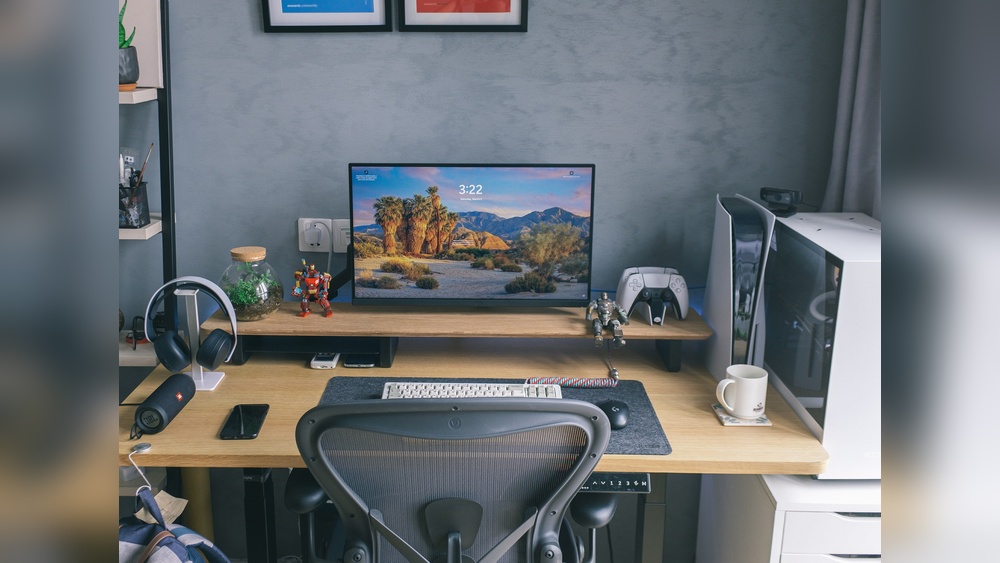
Place your monitor at eye level to avoid neck strain. The top of the screen should align with your eyes when sitting upright. Keep the monitor about an arm’s length away from your face. Tilt the screen slightly upward for better viewing comfort. Proper monitor placement helps prevent headaches and eye strain.
Footrest For Posture
A footrest supports your feet if they don’t reach the floor. It helps keep your knees at a 90-degree angle. Using a footrest improves blood flow and reduces pressure on your lower back. Choose a footrest with an adjustable height and angle. This simple tool can make sitting for long hours much more comfortable.

Credit: www.youtube.com
Lighting Setup
Good lighting improves focus and reduces eye strain in your home office. Setting up proper lighting creates a comfortable workspace. Balance natural and artificial light for best results.
Using Natural Light
Place your desk near a window to get natural light. Natural light boosts mood and energy during work hours. Keep the window to your side to avoid screen glare. Use light curtains to soften harsh sunlight. This setup helps reduce the need for artificial lights during the day.
Artificial Lighting Options
Choose a desk lamp with adjustable brightness and color temperature. Warm light is relaxing, while cool light helps stay alert. Overhead lights should provide even lighting without shadows. Avoid harsh fluorescent lights that cause eye fatigue. Consider LED lights for energy efficiency and long life.
Organization Tips
Keeping your home office desk organized boosts focus and productivity. A tidy workspace reduces stress and saves time spent searching for items. Use simple strategies to maintain order and create an efficient work environment.
Clearing Desk Space
Start by removing everything from your desk. Only place essential items back, such as your computer, notepad, and a pen. Keep the surface clean and clutter-free to allow more room for work. Regularly clear unnecessary papers or objects to maintain space.
Storage Solutions
Use drawers, shelves, or desk organizers to store supplies neatly. Small containers can hold pens, clips, and sticky notes. Label storage boxes to find items quickly. Vertical storage saves space and keeps the desk surface clear.
Cable Management
Untangle and group cables using clips or ties. Route cords behind the desk or along walls to avoid mess. Use cable sleeves to bundle wires for a clean look. Proper cable management prevents damage and makes cleaning easier.
Digital Decluttering
Organize files and folders on your computer regularly. Delete unused documents and apps to free up space. Use cloud storage for important files and backups. Keep your desktop screen clean by limiting shortcuts and icons.
Tech Essentials
Setting up your home office desk requires essential technology to work smoothly. The right tech tools improve productivity and reduce frustration. Choose devices and accessories that fit your space and tasks. Organize cables to keep the desk tidy and functional. Focus on equipment that boosts comfort and efficiency for daily work.
Primary Computer Setup
Select a computer that matches your work needs. A laptop or desktop with enough speed and memory helps handle tasks without lag. Place the computer in a spot with good ventilation to avoid overheating. Use a comfortable keyboard and mouse for long hours. Keep the screen at eye level to protect your neck.
Adding A Second Monitor
A second monitor increases screen space and multitasking ability. Connect it easily using HDMI or USB-C cables. Arrange the monitors side by side for smooth eye movement. Adjust brightness and color settings to reduce eye strain. This setup helps in managing multiple programs at once.
Reliable Wi-fi
Strong internet is critical for online meetings and cloud work. Position your router close to your desk or use a Wi-Fi extender. Choose a plan with enough speed for video calls and file sharing. Test the connection regularly to avoid interruptions. A wired Ethernet connection can offer more stability if possible.
Power And Surge Protection
Use a power strip with surge protection to safeguard devices. This prevents damage from power spikes and outages. Arrange cables neatly with clips or ties to avoid tangles. Place the power strip within easy reach but away from foot traffic. Check the strip’s capacity to handle all your equipment safely.
Noise-canceling Headphones
Noise-canceling headphones block out distractions and improve focus. Choose a comfortable pair with good sound quality. Wireless models add freedom of movement around the desk. Use them during calls or when you need quiet time. They help maintain concentration in busy home environments.
Personalizing Your Space
Personalizing your home office desk creates a space that feels truly yours. It boosts comfort and motivation. Small touches can make long work hours more enjoyable. Your desk should reflect your style and inspire focus. Adding personal elements helps balance work and relaxation. Here are some simple ways to add personality to your workspace.
Incorporating Plants And Decor
Plants bring life and color to your desk. They improve air quality and reduce stress. Choose low-maintenance plants like succulents or snake plants. Place them where they get enough light but do not clutter your space. Decor items like photos, artwork, or small sculptures add character. Use items that make you smile or relax. Keep decor minimal to avoid distractions.
Adding Inspirational Items
Inspirational items keep you motivated throughout the day. Use quotes, vision boards, or small trophies that remind you of your goals. Keep these items visible but not overwhelming. A simple framed quote or a motivational calendar works well. Change items regularly to keep your space fresh. These touches encourage positive thinking and focus.

Credit: www.youtube.com

Credit: www.remotecompany.com
Frequently Asked Questions
How To Set Up A Home Office Desk?
Set your home office desk with an ergonomic chair and adjustable desk. Position the monitor at eye level. Use natural side lighting and add a desk lamp. Keep the desk tidy with organizers and manage cables neatly. Include essential tech like a reliable computer and strong Wi-Fi.
Personalize for comfort and focus.
What Is An Ideal Home Office Setup?
An ideal home office setup includes an ergonomic chair and desk, good lighting, organized cables, essential tech, and a clutter-free workspace.
What Are The 3 P’s For Having A Clean Desk?
The 3 P’s for a clean desk are: Purpose—keep only essential items; Placement—organize items neatly; and Persistence—maintain cleanliness daily.
How To Organize Work From A Home Desk?
Organize your home desk by choosing an ergonomic chair and adjustable desk. Position lighting to reduce glare. Keep essentials only and manage cables neatly. Use storage solutions to declutter. Personalize the space to boost focus and comfort. Maintain digital files to reduce paper clutter.
Conclusion
Setting up a home office desk takes planning and care. Choose a chair and desk that support good posture. Arrange lighting to reduce eye strain and boost focus. Keep your desk tidy with smart storage and cable management. Add personal touches to make the space inviting.
A well-organized desk helps you work better every day. Small changes create a comfortable and productive environment. Start with these simple steps to build your ideal workspace.